Frustration with 1000 stock limit in chartlists

So I started actively investing in 2020 along with the pandemic, and discovered Stockcharts through Chris Ciovacco's guest videos he did for them, and David Keller's super helpful information on The Final Bar. I've learned a lot and now do swing trading in 25% of my account, and have the rest managed by a money manager.
My problem is that it's easy to manage a lot of stock tickers in a single chartlist, setting numbers in front of the names so I can organize them into things I own, things one of my mentors owns, things I want to check every day, etc. BUT, since I can only have 999 stocks in the chartlist, there are things I'd like to keep tabs on (mainly things I have traded in the past and still want to run scans on), but I have to delete tickers to make room for new ideas suggested by a couple channels I follow. I sometimes find a move I missed because I had to remove it from my main chartlist.
I know, we should all be like Grayson Roze and have everything super organized into 25 different chartlists. The big problem is how hard it is to move a stock from one chartlist to another one.
Seemingly, the "best" way to move a stock from one list to another is to click the current chartlist at the top of the screen, click Edit, wait for the huge page to load, find the stock, add a check to the item, and use the two arrows to move the stock to another chartlist. This takes several seconds and is way slower than the excellent method used in TradingView (right click the ticker, turn off one watchlist, turn on another, to move from one watchlist to another).
My question is, is there a better way to move a stock I'm looking at currently to another chartlist other than this method? Am I the only one who finds it much easier to manage things from a single chartlist rather than maintain several?
This limitation honestly has me wanting to move to another platform…


Comments
-
We all have different cognitive styles, so what's easier for one doesn't work for another (for instance, I couldn't do it your way, but no doubt you wouldn't want to do it my way, which is separate lists for things that have something in common).
Nevertheless, would it work for you to "move" a symbol just by editing the target list to just add the symbol you want to move there? No reason you couldn't have it in both lists, or you could delete it from the original list.
I understand that if the chart is annotated or doesn't use your default chart style that wouldn't work, so just a suggestion.
0 -
"My question is, is there a better way to move a stock I'm looking at currently to another chartlist other than this method? Am I the only one who finds it much easier to manage things from a single chartlist rather than maintain several?"
Another way to "move" a symbol from one list to another is using the Advanced SharpChart Workbench. At the top of the page you will see the current chartlist and the chart name. To the right is a SAVE AS button.

Click on that and you will be shown a Save Chart window.
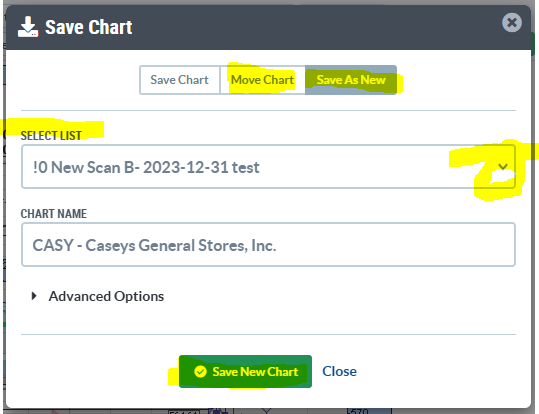
There is a dropdown to select the new Chartlist you would like to Save As New the chart. You can edit the Chart Name here also. The Advanced Options is to add a Comment to the chart. Comments show below each chart in ChartList View. Using the Save As keeps the chart in both chartlists. The current one, and the one you select to Save As New. You can also save the same chart to the same chartlist to get it in that list twice or multiple times. A use case for this would be if you have a Daily chart and you want a Weekly chart, you'd change the chart in the workbench and then Save As to get that Daily and Weekly in the Same ChartList.
You can also Move Chart to another Chartlist from here. This will take the chart out of the current list and move it to the list you select from the dropdown.
Hope this helps?
0


Categories
- All Categories
- 2.4K StockCharts
- 397 SharpCharts
- 146 Other Charting Tools
- 69 Saved Charts and ChartLists
- 1.5K Scanning
- 74 Data Issues
- 177 Other StockCharts Questions
- 224 Technical Analysis
- 155 Using Technical Analysis
- 6 InterMarket and International
- 19 Market and Breadth Indicators
- 44 Market Analysis
- 109 Trading
- 109 Trading Strategies
- 162 S.C.A.N the StockCharts Answer Network forum
- 64 Using this StockCharts Answer Network forum
- 98 s.c.a.n. archives
- 7 Off-Topic
- 7 The Cogitation & Rumination Emporium
- Forum Test Area